Learn to use this field guide
Colorado Plants & Practical Care is an illustrated reference to garden weeds and wild plants found in Colorado. Use it to compare what plants look like and read sourced information about their effects on people, animals and local habitats. A plant profile is simply a page about one plant, with photographs, descriptions and links to the sources.
Colorado Plants & Practical Care, the bot in BoodleBox, is your tutor for using this website. It explains where to click, what the page sections mean and how to discuss what you read. You can learn the site without knowing any plant names or having a plant to identify.
Meet the two examples
We will visit Russian thistle first, then showy milkweed. These are reference examples for learning the site; you do not need either plant in your yard.
1. Russian thistle: recognize a tumbleweed
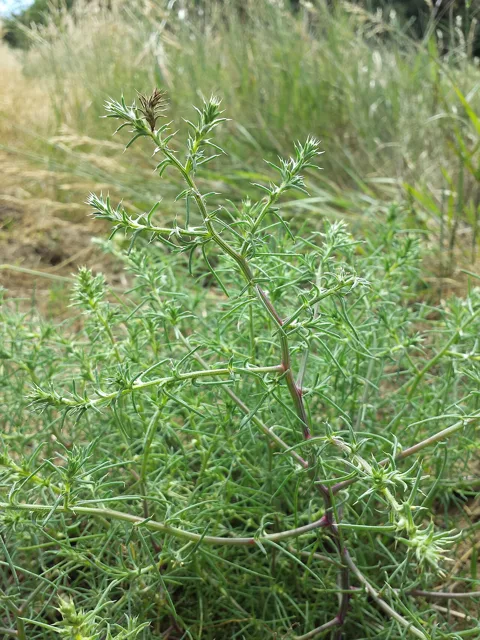
A widespread introduced weed that dries into a tumbleweed. We will use our Russian thistle page to practice searching, compare the photographs with Recognize, and read Plants & habitat to learn how it spreads.
2. Showy milkweed: check pet hazards
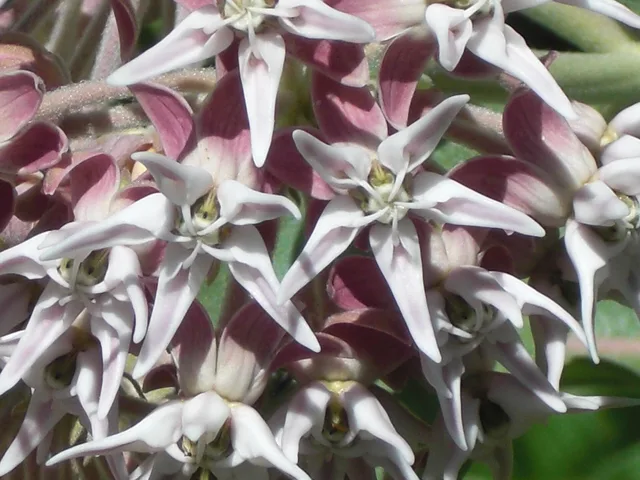
Its pink flowers make an appealing second example. Our Showy milkweed page has a Dogs & cats section explaining the pet warning and its limits. Milkweeds are toxic to dogs and cats; the warning covers milkweeds as a group. The original ASPCA reference is available on that plant page.
Read more in our guide: Russian thistle · Showy milkweed. Each plant page includes the evidence, original references and full photo credits.
Now open the plant library
Open the plant library, then tell the bot ready. Keep using the same BoodleBox conversation. If you have not opened the tutor yet, open Colorado Plants & Practical Care and choose Start New Chat.
The tutor will guide you through these steps, one at a time:
- Find a familiar weed. Search for Russian thistle, a widespread tumbleweed. Use its photographs and the Recognize and Plants & habitat sections to learn what a plant page can tell you.
- Check a flower’s pet warning. Next, search for showy milkweed. Read Dogs & cats on its plant page to understand the warning and its evidence. Original sources are there if you want more detail; opening them is optional.
- Discuss what you learned. Later, return here to prepare a short practice message called a note. Put it in BoodleBox, review it and press Send. The tutor can then discuss your takeaway or answer your question.
Start with the library; the note form below is for that later step. Selecting a reference plant is not a confirmed identification of a plant outdoors.
Later in the tour: prepare a note for BoodleBox

Colorado Plants & Practical Care ↗
The BoodleBox tutor that walks you through this website.
2. Take it to your guide
Your note, selected profiles and reference links are ready below. Review them before sharing. The guide also has a reference book covering all the plants. Nothing has been sent to BoodleBox.
Open Colorado Plants & Practical Care ↗
In BoodleBox, choose Start New Chat, or keep using your existing Colorado Plants & Practical Care conversation. With the updated Fieldwork extension and both pages in Chrome split view, Put note in BoodleBox fills the empty chat draft. Review it and press Send.
Without that button, use the small copy icon, paste into the chat, and press Send. Ask the guide about what you noticed. Its links bring you back to a profile or comparison.
For a suspected poisoning, use the exposure and safety guide immediately.
What is shared?
Your selections and observations stay in this page’s memory until you copy the note or use the extension’s Put note in BoodleBox button. That button prepares a draft; pressing Send shares it with BoodleBox. The guide does not receive later clicks automatically. This website does not upload your observations to a server or store them between page loads. Reloading loses unsent observations.
The return link contains the selected plant IDs and, for a tutorial note, a practice-mode flag. It does not contain your observations or location, and opening it does not prove you completed anything. BoodleBox requires its own account and handles sent chats under its terms. This independent field guide is not operated by BoodleBox.
Read with an AI assistant · Markdown and sources
Markdown: https://denson.github.io/colorado-weed-field-guide/companion/index.md
Text fallback: https://denson.github.io/colorado-weed-field-guide/companion/index.md.txt
Start here: https://denson.github.io/colorado-weed-field-guide/start.md
Source ledger: https://denson.github.io/colorado-weed-field-guide/provenance.json